General Info:
Please send us your basic contact information so we can get your account on file.
Preparation
Before you start this process, be aware that you are going to need a lot of different items and information to complete it. Make sure you have the following on-hand, if possible, before you begin.
- You’ll need access to a credit card. Most of these services have some option to mail in a form of payment, but this will significantly slow down the process. Alternatively, you can use a debit card, or you can purchase a pre-paid gift card at any number of retail locations. Note that this process will likely cost over $2,000 in total.
- You will need envelopes and postage stamps to mail documentation overseas. You can buy stamps online or at any post office.
- You will need to enter extensive personal information for the documentation you have available, including the numbers on your Social Security card and passport, the details of your various certifications and professional licenses, along with completion dates and contact info from various institutions like schools and government agencies. You may skip ahead and read through the steps in this app to help gather this information.
- You’re going to have to reach out to your school for official transcripts, multiple times. You will need to obtain these documents for yourself if you don’t already have them, and you will also need to have them sent directly to multiple agencies.
- You must speak, read and write English fluently. If English is not your native language, you must have a level 7-8 of ESL classes. You can register for ESL classes with City Colleges of Chicago.
- You will need access to a printer and a scanner. Note that iPhones can scan from the notes app, and that many Android phones’ cameras have this feature as well.
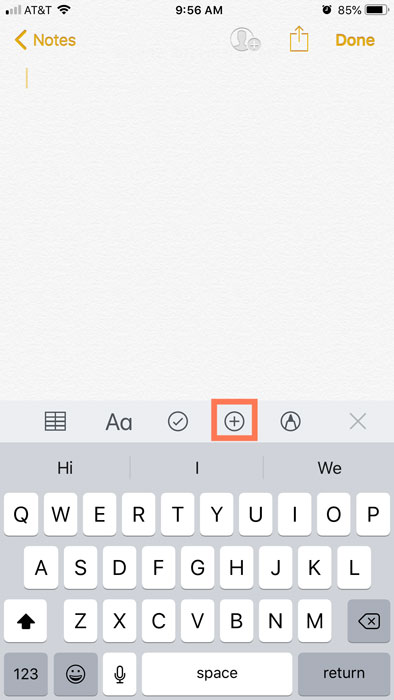
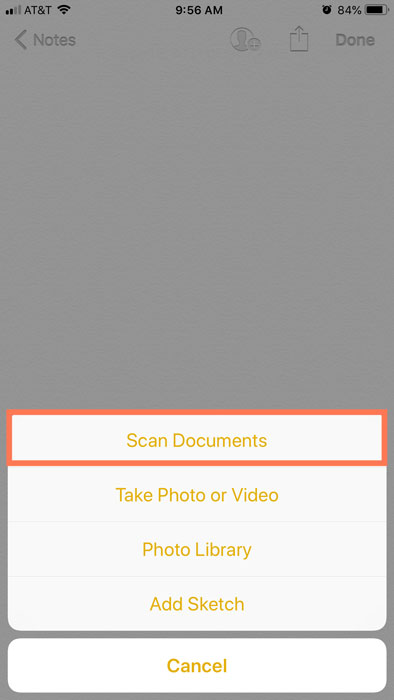
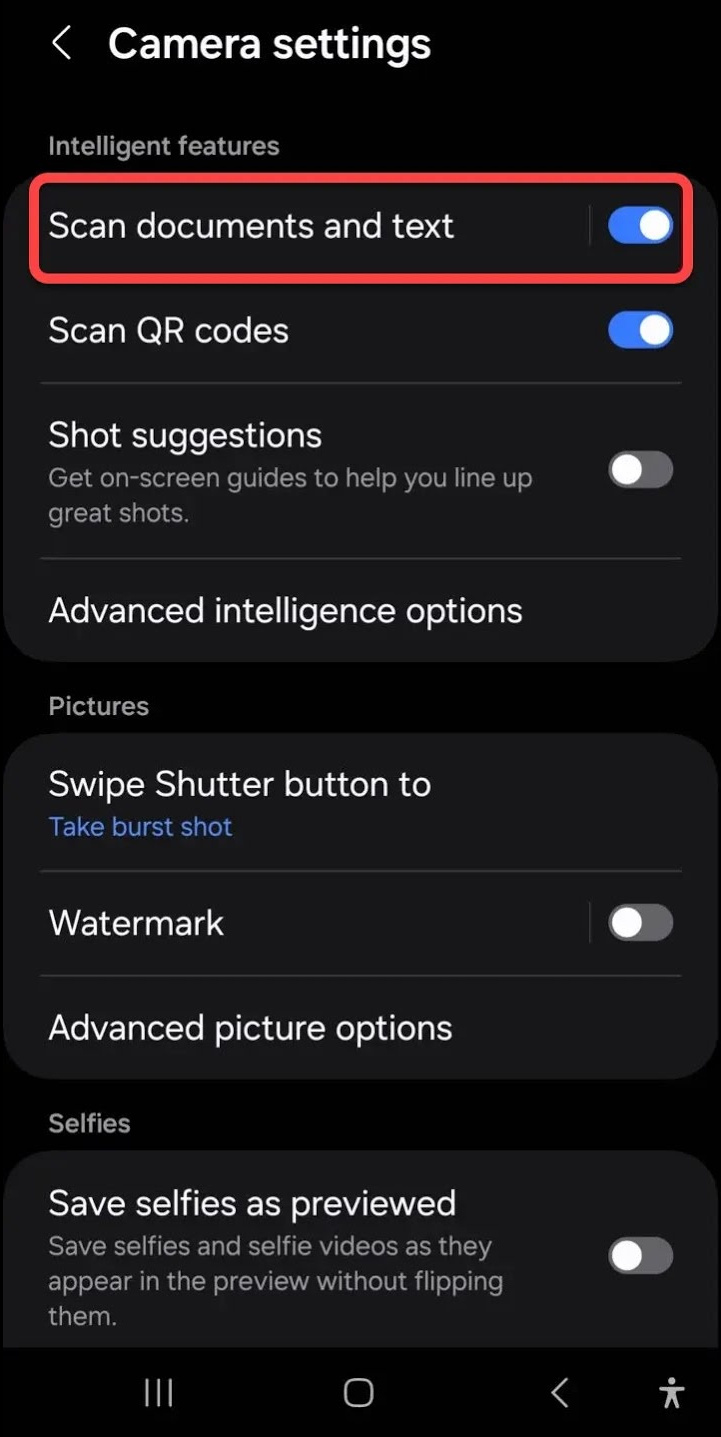
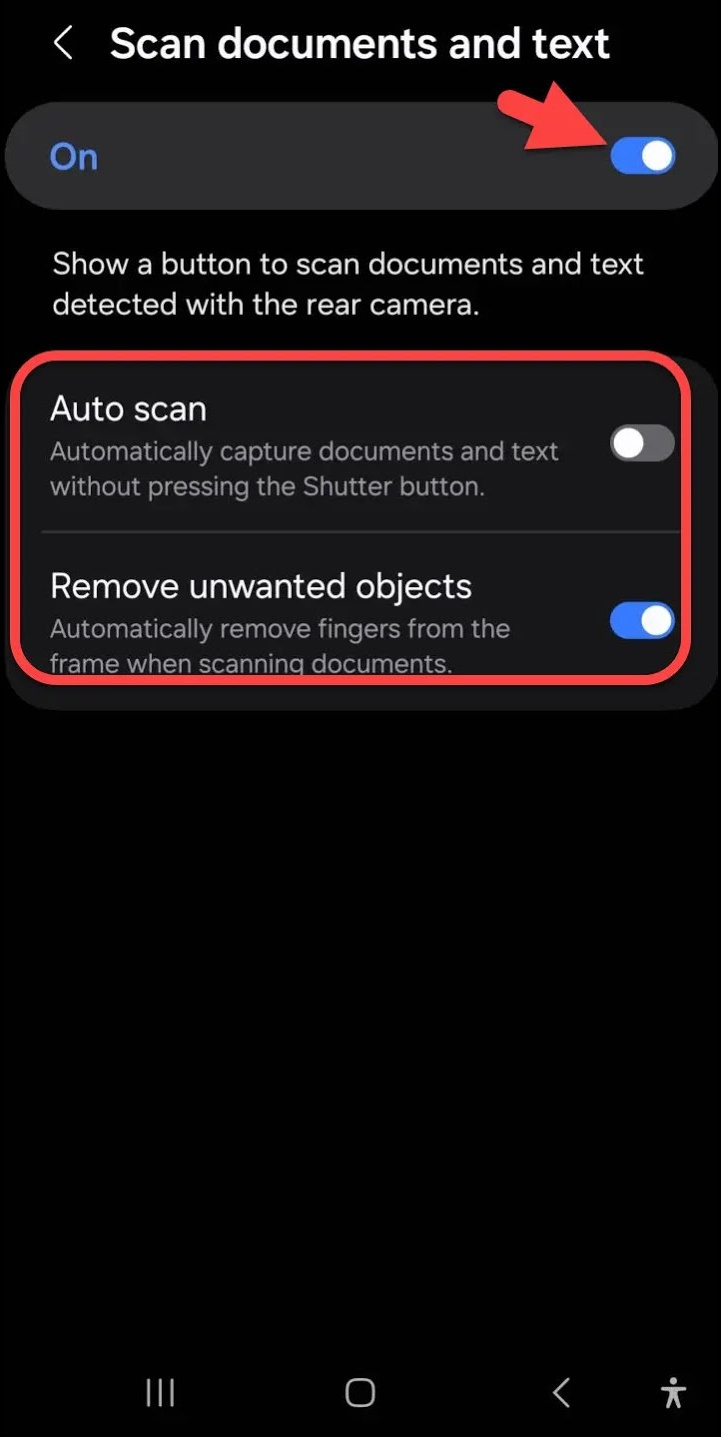
Once you have these items, you can proceed.
Certification process
To obtain your RN license, you must complete the following steps:
- Evaluate your credentials with CGFNS
- Translate your credentials into English
- Take the English proficiency exam
- Submit Proof of English Language Proficiency to CGFNS
- Become a Registered Nurse
- Alternative: Become a CNA
Evaluate your credentials with CGFNS
We suggest that you evaluate your credentials with the Commission on Graduates of Foreign Nursing Schools (CGFNS) because we are authorized agents for their organization and can help you in that process. CGFNS fees are $485 plus $85 for each page you need translated (Diploma, License and transcription of credits). The total cost for this step is $740.
You will have one year to submit your application once you open your account. Alternatives to CGFNS include Education Records evaluation Services, Josef Silny and associates, The Evaluation Company, and International Education Evaluations.
Register with CGFNS
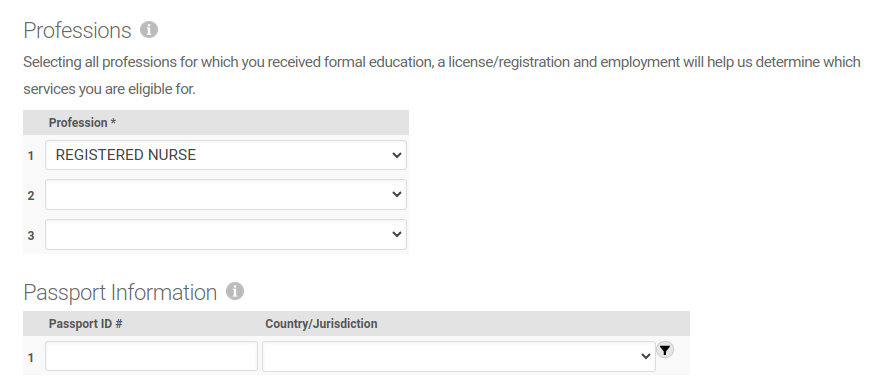
You will need to create an account to continue. Here is what you will need to finish this section:
- Basic info (first and last name, date of birth);
- It will ask for your passport number and the country from which it was issued. This is optional but you will move through the process quicker if you have this information now.
- It will also ask you for a current Healthcare Profession License.
- It will ask you for your education history. Be prepared with the name of your college or university and the year you graduated
Complete your profile
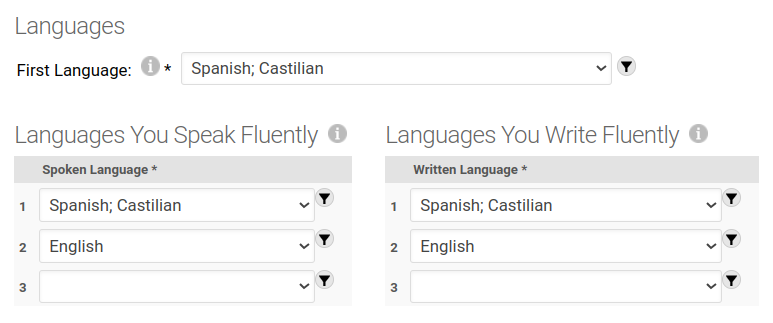
Once your account is created, you will be required to enter your address and phone number. Make sure you’re logged in and then continue to page 1 of your profile.
- Here you will need to add sex, Marital Status, whether you have a social security number.
- If you’ve ever had a background check, you’ll need the name of the agency that performed it and the year it was performed.
- Enter your Country of birth and a list of countries where you hold citizenship.
- Your first language, and a list of languages you speak and write fluently.
- A list of professions for which you received formal education.
Upload your photo

Assuming you are still logged into CGFNS, You will now need to upload a passport-style photo of yourself. The photo should be:
- Square, At least 350px × 350px;
- Unsigned and in color;
- Taken within the last 6 months;
- In front of a plain white background (or off-white);
- Taken in full-face view, directly facing the camera, alone (not cropped from a group photo), so that head and shoulders take up most of the photo;
- With a neutral expression, in your everyday clothing, with both eyes open;
- Do not wear a head covering that obscures the hair unless work for religious purposes.
- If you normally wear glasses or hearing aids, wear them in the photo. Make sure the glasses are not tinted, and that they don’t reflect glare in the photo.
Add CBNC to your account
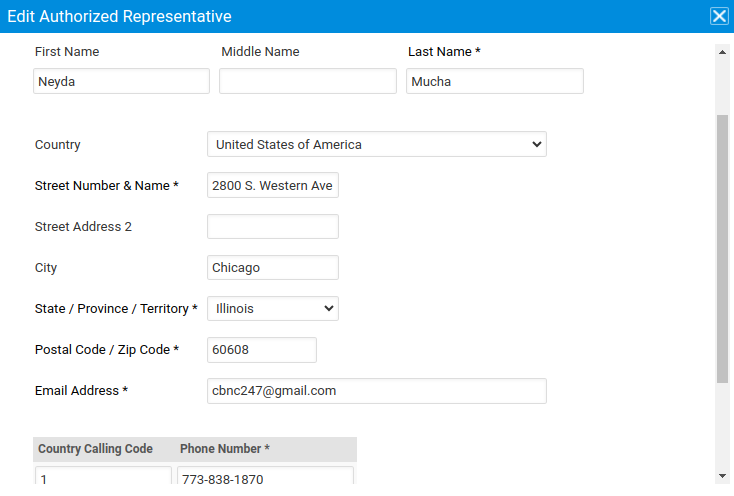
The next two steps will require you to add CBNC as your authorized agent and representative with CGFNS. Log in if you aren’t already, and continue to the sponsor advocate section.
- You will need to add CBNC as your authorized agent:
- Under ‘Authorized Agent Search Type’, check ‘Authorized Agent ID or Name Search’
- Under ‘Authorized Agent ID or Name’, enter ‘Chicago Bilingual Nurse Consortium’
- Check the box starting with ‘I authorize CGFNS…’
- You will want to add Neyda Mucha as your authorized representative:
- Neyda Mucha
- 2800 S. Western Avenue, #1202, Chicago, Illinois, United States of America
- cbnc247@gmail.com
- 1-773-838-1870
Employment
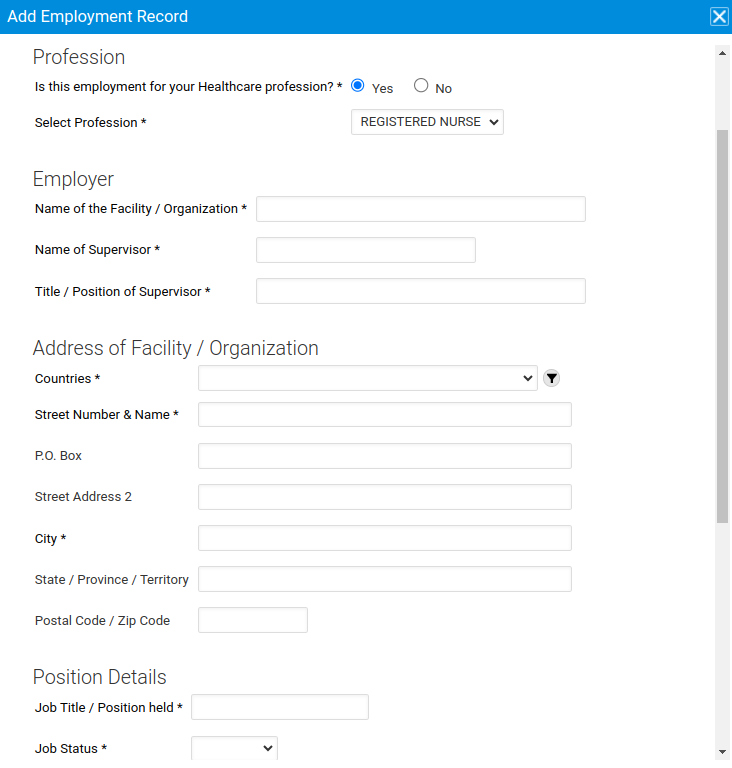
Enter your employment information on page three of your profile. Log into CGFNS if you aren’t already, and enter:
- The name of the organization;
- Your job title;
- The name and title/position of your supervisor;
- The location of the employer: country, address, state and postal code
- The date employment started;
- Whether you’re still employed here and whether it’s healthcare-related;
- The language spoken there. If you do not have the details of this record, you will need to explain why by clicking the button that says “Add Explanation”
Specialties
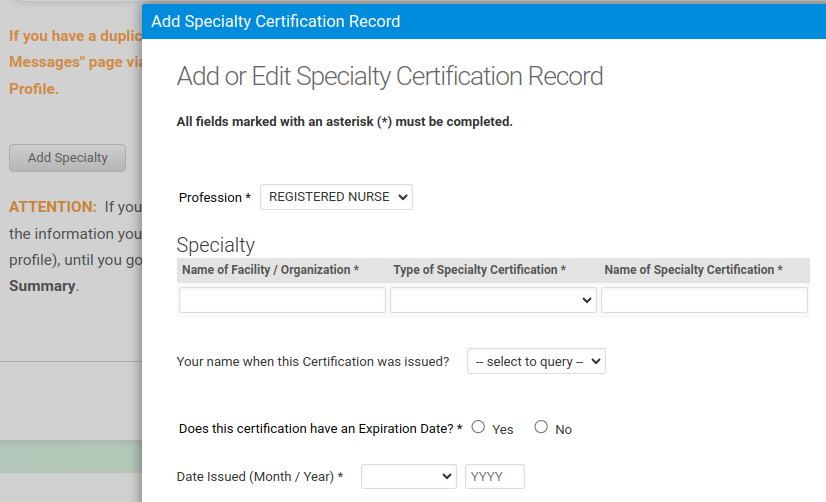
Continue to page four of your CGFNS profile, and add in your specialties. Log in if needed and enter:
- The name of the facility or organization,
- type of specialty certification,
- name of the specialty certification,
- expiration date of the certification (if applicable),
- date issued, and
- address of the organization.
Licensure / registration information
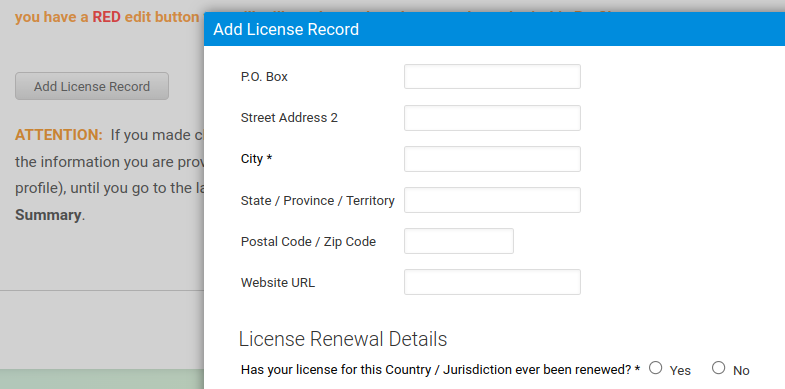
Enter any licenses you currently hold on page six of your CGFNS profile. Log in if you need to and enter:
- The country and state where you got your license;
- The issuing authority;
- Your professions;
- Your title, in English and in the original language;
- The address of the licenser;
- The date the license issued or renewed;
- Its expiration date, if any;
- The license number;
- The method of licensure (exam, renewal or other);
- The license status (Active, expired, restricted, suspended/revoked, inactive, never issued);
- The reason your license was revoked or suspended, if applicable
Licensure / registration exam record
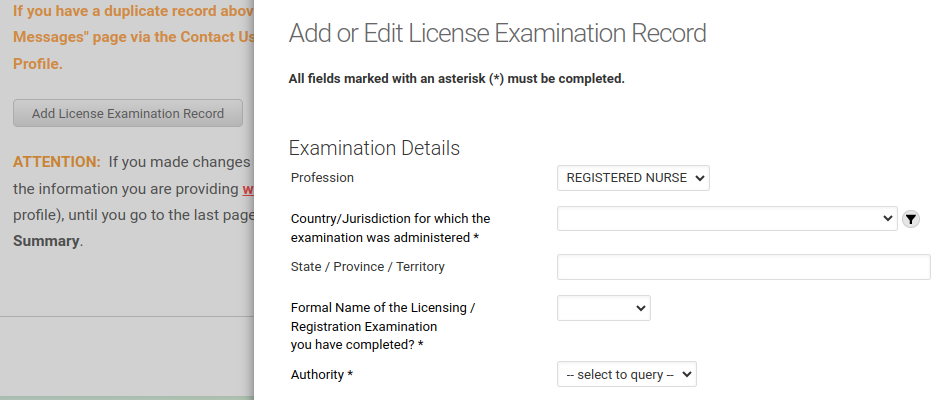
Enter the details of any exams you took to obtain your license(s) on page seven. If you aren’t already, log in to CGFNS and enter:
- Your profession;
- The state and country where you took the exam;
- The formal name of the exam;
- Your NCLEX candidate ID number, if you have one;
- The exam authority;
- The address of the exam facility; and
- How many times you took the exam, whether you passed, and when.
Education information
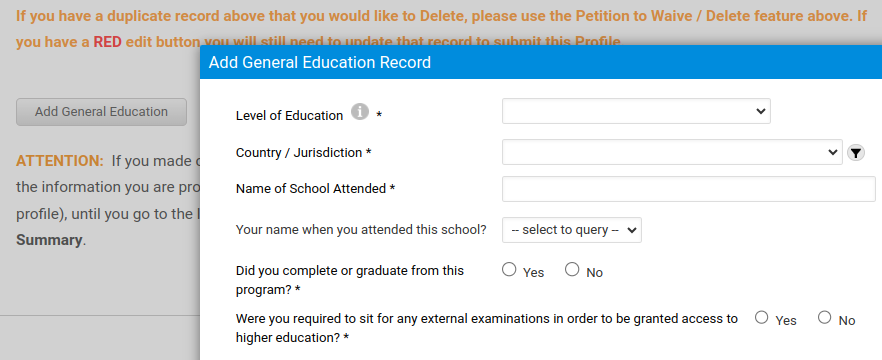
Enter your education history on pages eight and nine of your CGFNS profile (log in if needed):
Higher Education information
- Education level and type
- Country and state
- Name of the school
- Date completed
- Name of the diploma, in English and the native language
- Admission and completion date
- Whether the school has closed or merged with another school (and the name of the school it merged with)
- The address of the school attended (this will be auto-populated, probably)
Primary Education information
- Education level
- Country and state
- Name of the school
- Name of the diploma, in English and the native language
- Name of the exam required to be granted access to higer ed (optional), with the name of the examining body and the name of the certificate awarded
- Issue date
- Admission and completion dates
- Whether the school has closed or merged with another school (and the name of the school it merged with)
Translate your credentials into English

Now that you have submitted your profile to CGFNS, they will review and ask you for any additional information. Once you’ve purchased your application, you will see it listed in your dashboard as “Credentials Evaluation Service (CES) – CES Professional Report Application“. Follow that link and scroll down to “Primary Source Documents” and you will find two PDF documents:
- Nursing Education form, and
- Request for License / Registration / Diploma – Nurse
Print out both of these documents, and sign the first page of both. You must mail the first form to your school, and the second to the nursing regulatory/licensing authority in your country of origin.
Inside each envelope, you can include an addressed, stamped return envelope to go to CGFNS. This might expedite the process. Make sure the return envelope is addressed to the following location:
CGFNS International, Inc.
3600 Market Street, Suite 400
Philadelphia, PA 19104-2651
United States
And the “from” addresses should be your school and the licensing authority, respectively.
Once these organizations mail in completed the completed forms, CGFNS will then reach out to each for verification. It can take 2 or 3 months for CGFNS to complete this process and return the translated credentials. In the meantime, you should consider taking the proficiency exam.
Take the English proficiency exam
If your formal education was in English, you can mark this task and the next task complete and skip past them. Otherwise, if you are fluent in English, or have already taken the proficiency eam, you will have to present proof that you passed the test and when.
- Create an account at ETS, and then Log in;
- Use the ETS Testready system to prep for your exam.
- When you’re ready, you can register for a test in your area.
This test will cost $255. When you register, be sure to tell ETS to send the results CGFNS and IDFPR, as well as yourself. You will receive the result of your exam, via email, within 48 hours of taking the test.
Submit Proof of English Language Proficiency to CGFNS
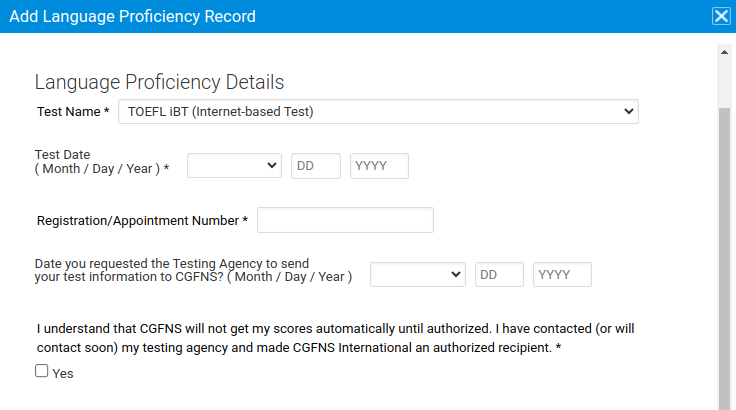
Once ETS emails you the results of your Toefl test, you will need to ask them to send the results to CGFNS. In the meantime, Log back into CGFNS and then navigate to page 10 and enter:
- The name of the test you took;
- The date of the test;
- Your score report code; and
- List ETS as the Testing Agency, along with the date you asked them to send your test results to CGFNS.
Become a Registered Nurse
Now that you’ve completed the GCFNS process and taken an English exam, you can take the NCLEX exam to become an RN. In the meantime, you may also pursue a path to becoming a certified nursing assistant (CNA).
And/or:
Initiate an NCLEX review course
The NCLEX review course is necessary to take the NCLEX exam. Courses can last between 2–7 weeks depending where you take it.
We partner with CBNCLEX which can be reached at (331) 472-9641. They offer AM courses (9–noon) and PM courses (4–7).
- Their Comprehensive Program (Going back to the Basics) is a 7-week program, four times a week, and costs $1,500.
- The Fast Track program (Repetition of everything on a Highlighted Basis) is a 2-week program and costs $500.
CBNCLEX offers payment plans: $500 upon registration, then $500 every two weeks thereafter until full payment is received.
Review courses are also offered online through Kaplan, U-World, Remar, and Simple Nursing NCLEX-RN.
Other ways to prepare for the NCLEX exam
- Download the NCLEX sample pack.
- Download an exam preview.
- Review the NCLEX requirements for acceptable ID.
- Learn about Computer Adaptive Testing and the NCLEX Pass/Fail Rules.
Take the NCLEX exam
Applying for the Registered Professional Nurse (RN) or Licensed Practical Nurse (LPN) Examination is a dual process. All applicants must apply to both Continental Testing Services, Inc. (CTS) AND Pearson Vue Professional Testing.
Authorize CBNC with IDFPR
You will want to give CBNC your power of attorney with the Illinois Department of Financial and Professional Regulation. This will allow us to effectively advocate on your behalf with the state.
Finish filling in the form below.
You will then need to print it out and have it signed by a notary public. Once notarized, scan or photograph the document and email it to FPR.ThirdPartyAuth@illinois.gov, or mail it to the address below:
IDFPR
320 W. Washington St.
Springfield, IL 62786
Send proof of education to IDFPR
Before you apply to take the NCLEX exam, you will need to obtain the following information:
- Download the ED-NUR form and fill out the first section, under ‘applicant’.
- Mail the form to your school, following the same process as you did before to have the ED-NUR sent to CGFNS.
- The school must then fill out the rest of the form, sign it, and mail it to IDFPR at the following address:
Illinois Department of Financial and Professional Regulation
320 West Washington Street, 3rd Floor
Springfield, Illinois 62786
As before, you can pre-fill an envelope addressed to IDFPR, including the school’s return address and postage, and include this envelope inside the one you send to them.
Simultaneously, CGFNS will send your CES evaluation report directly to the IDFPR.
Apply through Pearson Vue
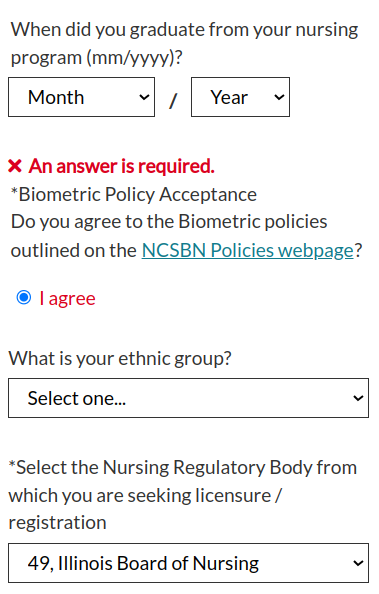
You must register for an account with Pearson Vue. The registration process asks for fairly basic information:
- First and last name, home address, phone number
- Date of birth, gender
- Social security number
- Your maiden name, if any, and your mother’s maiden name
- Your previous name if you had one, and the date you changed it
- Your primary language (English, another language, or English and another language)
Apply though Continental
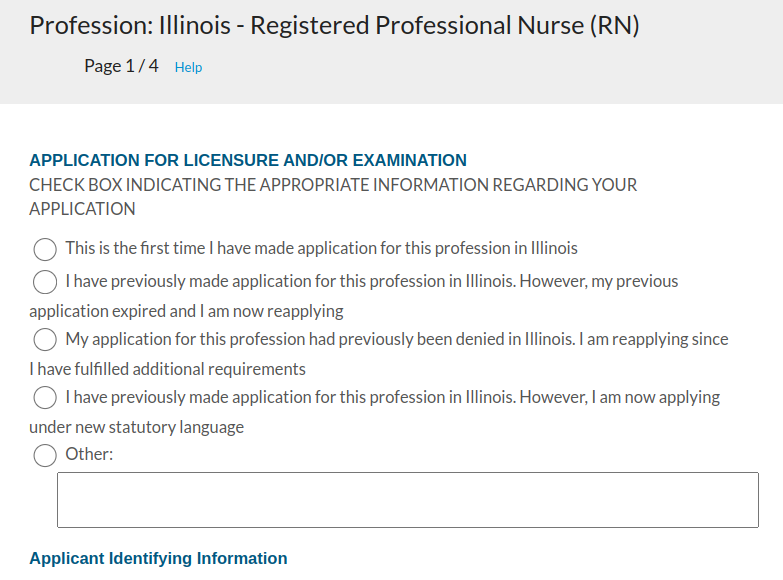
Continental provides the application to sit for the exam. Once Continental receives your application, they will review and may ask for additional documentation is some is not provided.
If the application is approved, Continental will contact Pearson Vue for approval. If you have also applied at Pearson Vue and your application was accepted, Pearson will email you the approval and you will be ready to schedule your exam.
- Apply online to sit for the exam. To apply, you will need to provide the following information:
- First and last name, and ‘given surname‘ (likely the same as your last name)
- Social security number
- Mailing address
- Date and place of birth
- Age and gender
- At least one phone number
- You will also need to input a lot of information you already entered into CGFNS, such as:
- Education history
- Specialties
- License and exam records
- Continental will also ask about your military, health and criminal history, including prior felony convictions.
- You will be asked to verify that you are not delinquent in income tax or child support payments.
This application will cost $107. Once you submit your application, you have 60 days to submit to a background check from the Illinois Police Department. For this reason, you should get fingerprinted as soon as possible.
Get fingerprinted
RPN applicants will need to obtain proof of fingerprinting by a licensed Illinois Live Scan Fingerprint Vendor. Once you get fingerprinted, the vendor will give you a receipt with a transaction control number (TCN). In addition, they will transfer your prints to the Illinois State Police to perform the background check. Once the state police complete their check, they will submit the results to the IDFPR.
Hold on to your receipt just in case there’s a breakdown in the process from the vendor, to the police, and then to IDFPR.
Schedule your exam
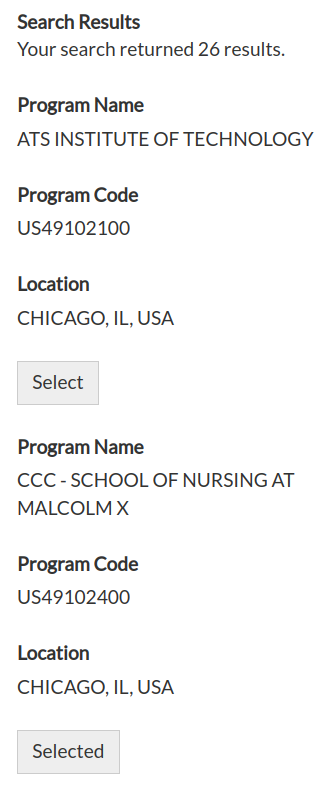
In order to schedule your NCLEX exam, follow these steps:
- Log back into Pearson Vue.
- Search by your area for a testing location. Chose ‘RN’ as the exam, ‘United States’ as the country and ‘Illinois’ as the state. For city, you can choose the one closest to you.
- When you click ‘search’, you will get a list of results. Select the exam where you want to take the test.
You will need to bring a valid, government-issued ID, and you should arrive at least 30 minutes before the test. This exam will cost $200.
Wait for results
Once you take the exam, Pearson Vue will provide the results to Continental Testing Services (CTS). If you pass the exam, CTS will mail your results to the IDFPR, and will mail you a pass letter.
- If you fail the exam, you must re-apply to Continental and Pearson Vue.
- If you pass the exam, CTS will automatically send your approval to the IDFPR, and they will email you instructions to lookup and print your RN license.
Apply to become a CNA
As an alternative to NCLEX, you can take a test to become a CNA (Certified Nursing Assistant) in Illinois. This gives you an opportunity to work in the healthcare field while you are preparing, and a sneak peek of what nursing is like in Illinois. You will be able to network with other nurses and have a chance to do nursing work under supervision until you get your license.
To complete this step, you can fill out the embedded PDF and use the download button in the upper-right to save the document ‘with changes’. You will need a printer for this step because you must sign the document.
You will also need to provide multiple documents:
- You’ll need to include your LPN or RN diploma, or other proof you completed a nursing program, translated into English.
- You’ll need to send your official transcript, translated into English. The transcript must include the total clinical hours of training your received for each course.
- You’ll need to attach a copy of Social Security Card.
Once you complete the form, you can scan and email it to dph.hcwr@illinois.gov along with the other documents listed above. If accepted, IDFPR will email you directions to register for the written competency exam. In the meantime, you can prepare by taking a practice test.
Note that this is a one-time chance. If you fail to submit the application properly, to show up for your test, or if you fail the exam, you will not be able to try again.
Take the nurse aide competency exam
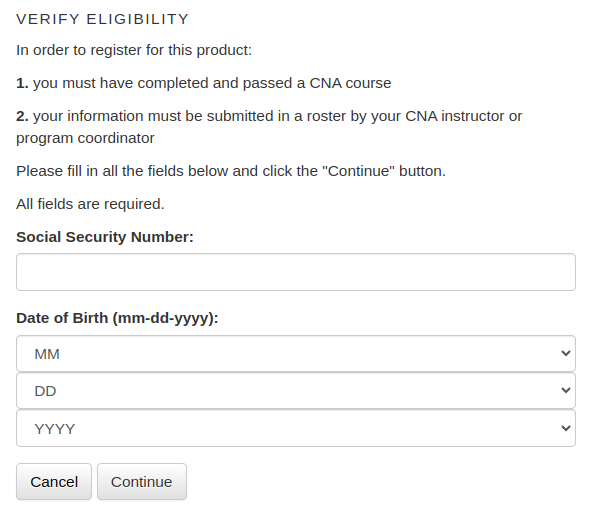
Once you receive an approval email from the Illinois Department of Health, you will need to complete the following:
- Verify your eligibility to register by entering your social security number and date of birth.
- Continue to create your username and password.
- Once you have registered, you can log in and begin to take the exam.
You can take this exam online, or in person, following the steps on the SIU website. You will receive a reply via email in about a week, and Southern Illinois University will submit your approval to the Illinois Department of Public Health to receive your CNA certification.
Submit to a background check
CNA applicants will need to obtain Proof of Fingerprinting by a licensed Illinois Live Scan Fingerprint Vendor. Once you get fingerprinted, the vendor will give you a receipt with a transaction control number (TCN). In addition, they will transfer your prints to the Illinois State Police to perform the background check. Once the state police complete their check, they will submit the results to the IDPH.
Hold on to your receipt just in case there’s a breakdown in the process from the vendor, to the police, and then to IDPH.
Check the IDPH Worker Registry
Once Southern Illinois University has submitted your approval to the Illinois Department of Public Health, the IDPH will list you on their worker registry. Search the registry by entering your first and last name. If you do not see your name on the registry, you can contact the IDPH for assistance.
Nursing app
This tool will help you become a nurse in Illinois by explaining and simplifying the process of obtaining an RN license. Once you check off your tasks, you can return to the same browser and it will remember your progress. This app will not store any of your personal information directly, other than to pass your name, email, phone number, language and country of origin to our office. Let’s begin by verifying your first language: